What Happens When SAP Fails Mid-Transaction (Data Rollback Explained Simply)
A lot of business data is processed by the SAP system every day. The employee data, payroll information, financial transactions, attendance records, invoice, and inventory data are some of the examples that get processed in the SAP system. Though a user sees only screens and buttons, there is a lot going on behind the scenes. Many activities are performed simultaneously under one transaction in SAP.
In case there is an error midway, SAP does not store the partial results; rather, it undoes the transaction and restores the old data. This procedure is known as rollback. In most cases, students learn about it when studying the SAP HCM Course.
How does SAP Handle Transactions?
Transaction in SAP refers to a single business activity. The activity can be a payroll update, employee transfer, leave approval, invoice posting, or stock update. Although the transaction might appear to be small on the screen, SAP updates multiple database tables at the same time.
When the transaction button is pressed, SAP does not immediately store the information. Initially, it validates whether each step of the process is completed successfully. Once all validations are passed, only then does SAP store the information.
In several practical business cases, this concept assumes importance in SAP HCM Certification Training as payroll and HR applications cannot tolerate any mistakes in the employee data.
What is Rollback?
Rollback only refers to undoing the changes that have not been completed yet.
Let's assume that SAP is modifying employee salary data. While doing so, SAP is also modifying tax data and pay data. Now let's suppose that the server fails or there is an outage on the network during this process. SAP will undo all the changes made rather than save incomplete data.
The same rollback process is also used in modern systems explained during an SAP S4 HANA Online Course because fast systems still need strong data protection.
Why is Rollback So Important?
The rollback process is one of the key reasons why SAP software is trusted by big firms.
If there were no such feature as rollback, companies would suffer greatly due to the following:
● Incorrect payrolls
● Double accounting entries
● Nonexistent employees' records
● Incorrect stock values
● Faulty reports
These errors will not occur because SAP ensures that incomplete transactions are never stored in its database.
In case salary data were modified while tax data modification failed within one transaction, the system would become unstable. The rollback process deletes the incomplete transaction. This is why rollback is viewed as a very important part of any SAP Online Training course.
How does SAP Check Transactions?
SAP follows something called the Logical Unit of Work, also known as LUW. It simply means SAP treats connected activities as one complete unit.
The system usually works in this order:
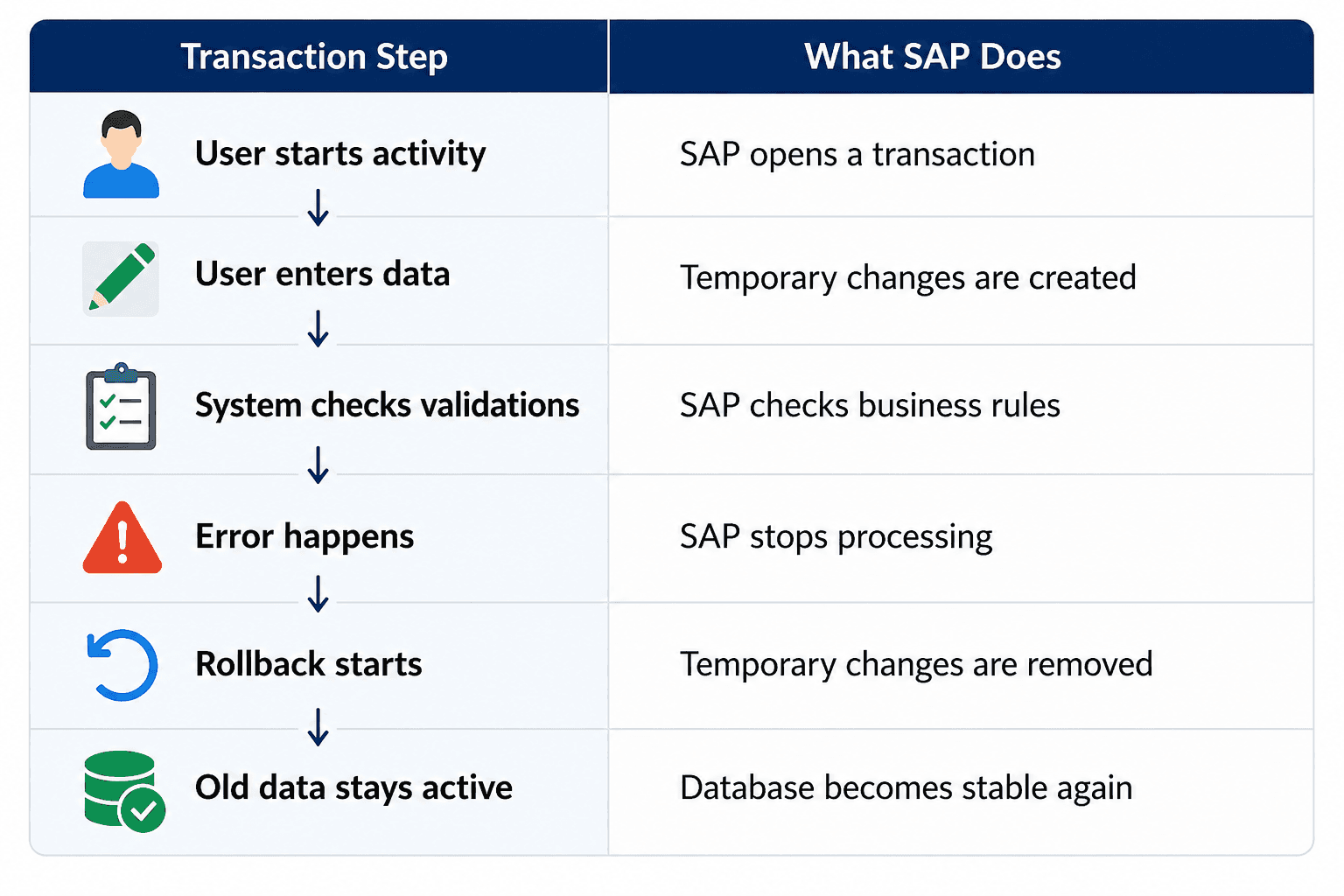
This entire process happens within seconds. Most users never notice it because SAP handles everything in the background automatically.
These transaction handling basics are commonly explained in an SAP HCM Course because HR processes deal with highly sensitive company data.
Locking System in SAP
Locks are used by SAP during transactions as well.
In case one user modifies a record, SAP will lock that record. It will prevent any other user from making any modifications to the same record at the same time.
In case the transaction fails:
● The lock gets released
● The temporary changes get deleted
● The original data remains safe
Thus, the locks and rollbacks complement each other to help maintain consistency in the database.
The use of locks and rollbacks complementing each other is normally discussed in detail when students undergo training for SAP HCM certification training.
Rollback in SAP S/4HANA
SAP S/4HANA is significantly faster than older SAP systems due to the use of in-memory database technology. However, although the processing is faster, rollback remains an essential part of the process.
Modern systems can still suffer from the following:
● Internet connectivity problems
● API failures
● Back-end jobs problems
● Database inconsistencies
● Programming errors
In case any of these problems occur, SAP S/4HANA rapidly deletes all unfinished transactions and restores the previous data.
The only difference is that the process is significantly faster since the database works from memory.
Such a backend operation is often mentioned in an SAP S4 HANA Online Course when explaining modern ERP architecture.
What Happens After Rollback?
Once rollback finishes, SAP cleans everything properly.
The system:
● Removes incomplete updates
● Releases locked records
● Restores previous values
● Generates technical logs
● Shows error messages
● Allows users to retry safely
SAP administrators then check system tools to find out what caused the problem.
Some commonly used monitoring tools are:
● ST22
● SM13
● SM21
These tools help support teams understand transaction failures and system issues.
Practical troubleshooting like this is usually included in professional SAP Online Training because companies expect SAP professionals to understand backend problems as well.
Key Takeaways
● SAP transactions contain multiple connected activities
● Rollback removes incomplete changes automatically
● SAP protects database consistency during failures
● Temporary data is not saved immediately
● Lock management supports rollback processing
● SAP S/4HANA performs rollback faster
● Rollback keeps payroll, HR, finance, and inventory data safe
● Monitoring tools help identify rollback errors
Conclusion
Rollback is one of the key mechanisms for ensuring data integrity within SAP systems. In case any transaction does not succeed during processing, the SAP system rolls back all the partial changes made and retrieves the old data automatically. Hence, rollback ensures that erroneous records do not enter the database. The mechanism helps ensure the accuracy and stability of the data related to payroll, financials, employee details, and inventory. In addition, rollback operates in tandem with lock management and transaction control for achieving optimum performance of the system. Despite being in advanced SAP S/4HANA systems, rollback remains an integral part of business processes.